
Restaurez le GPS et les métadonnées de votre export Snapchat
Votre export peut contenir des données de localisation dans memories_history.json, mais les applications photo ne peuvent pas les lire. FixMyExport écrit les coordonnées GPS dans les photos et vidéos prises en charge, puis restaure les dates et métadonnées compatibles.
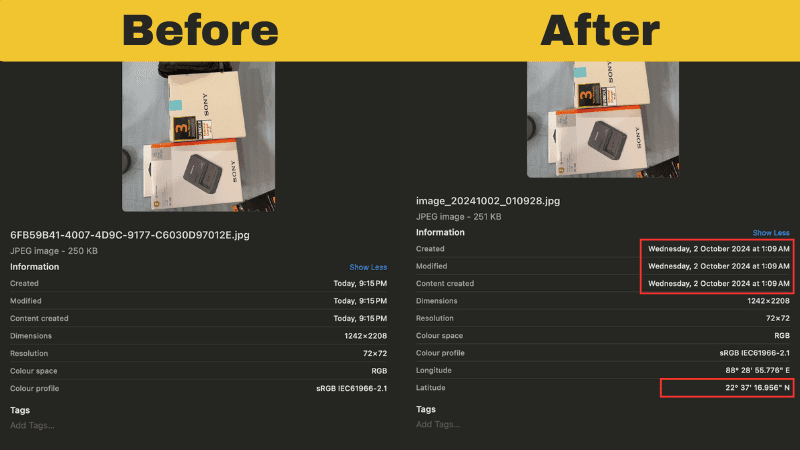
Il manque les données de localisation dans votre export Snapchat
Les données de localisation peuvent être présentes dans memories_history.json, mais vos médias ne portent pas les balises GPS EXIF nécessaires aux applications photo. FixMyExport restaure d’abord le GPS, puis les dates et métadonnées compatibles.
No GPS Coordinates or Location Metadata
Without embedded GPS latitude and longitude in EXIF tags, your photos won't appear on map views in Apple Photos or Google Photos. The location data exists in memories_history.json, but photo apps can't read JSON files. They need standard EXIF GPSLatitude and GPSLongitude fields written directly into each file. Location-based search and smart albums fail completely.
Missing DateTimeOriginal & Timestamp Fields
Your Snapchat export files lack DateTimeOriginal, CreateDate, and ModifyDate EXIF fields. According to Apple's photo metadata documentation, gallery apps rely on these specific fields to determine when photos were taken. Without them, every exported file shows today's date (the download date)instead of when you actually captured the memory. Your entire timeline becomes useless
Gallery Apps Can't Import Properly
Apple Photos, Google Photos, Adobe Lightroom, and other professional photo management apps expect standard EXIF metadata. When it's missing, import features break or files appear with wrong dates. The apps have no way to organize your Snapchat memories by date, location, or any other criteria. Manual sorting becomes impossible at scale.
Cloud Upload & Sync Problems
When you upload Snapchat exports to iCloud Photos, Google Photos, or Amazon Photos without proper EXIF metadata, the files appear with incorrect dates. Smart albums organized by date or location completely fail. You can't search for "photos from Paris 2023" because the EXIF GPSLatitude and GPSLongitude fields are missing. Sharing by time period becomes impossible.
How to Download Snapchat Memories with Metadata
FixMyExport solves the missing metadata problem by reading your memories_history.json file and embedding all EXIF data directly into each supported photo and video. Processing time depends on the device, selected options, destination, and library size.
Request Your Snapchat Data Export
Go to accounts.snapchat.com and request your data. Enable both "Export your Memories" and "Export JSON Files". Snapchat typically delivers the export within 24-48 hours. Download and extract every ZIP file.
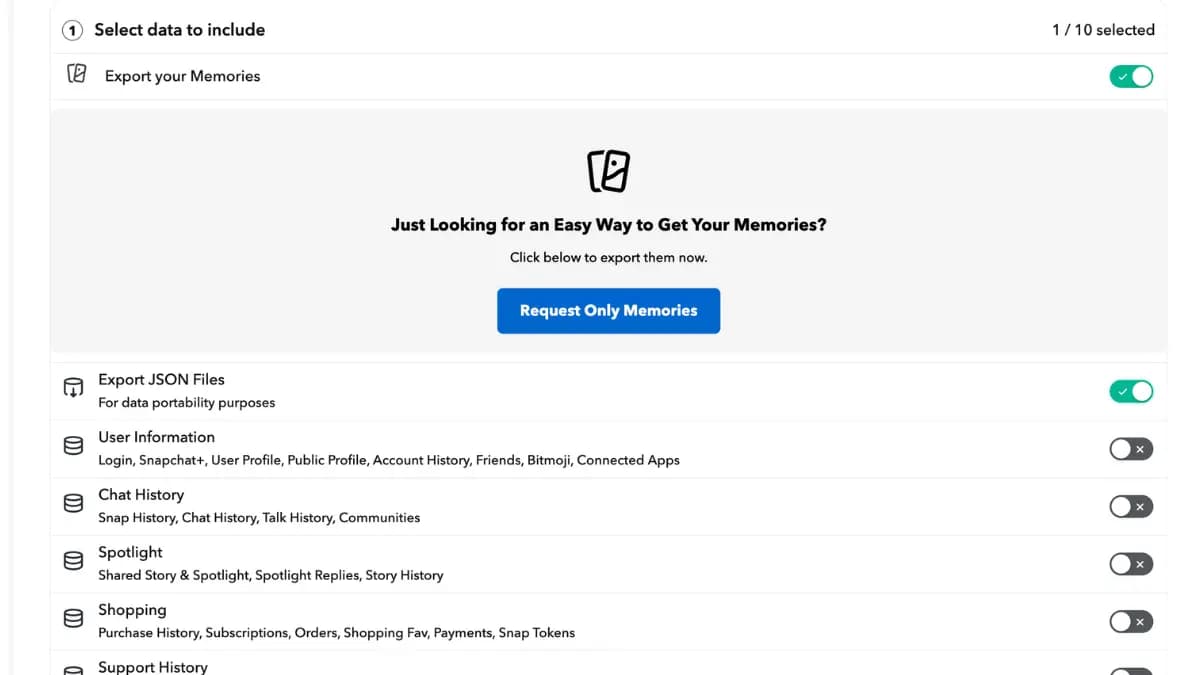
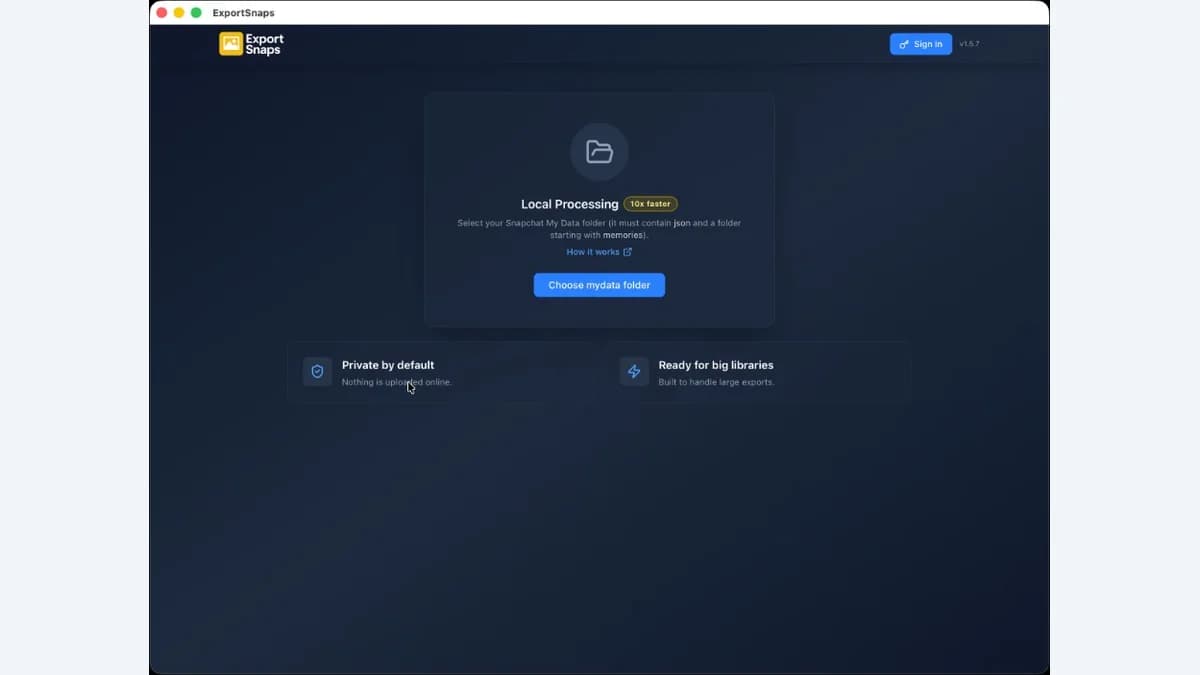
Select Your Primary My Data Folder
If Snapchat split the export across multiple ZIPs, combine the extra memories folders with the primary folder as shown in the full guide. Open FixMyExport and select the primary My Data folder containing the json and memories folders. Do not upload memories_history.json by itself.
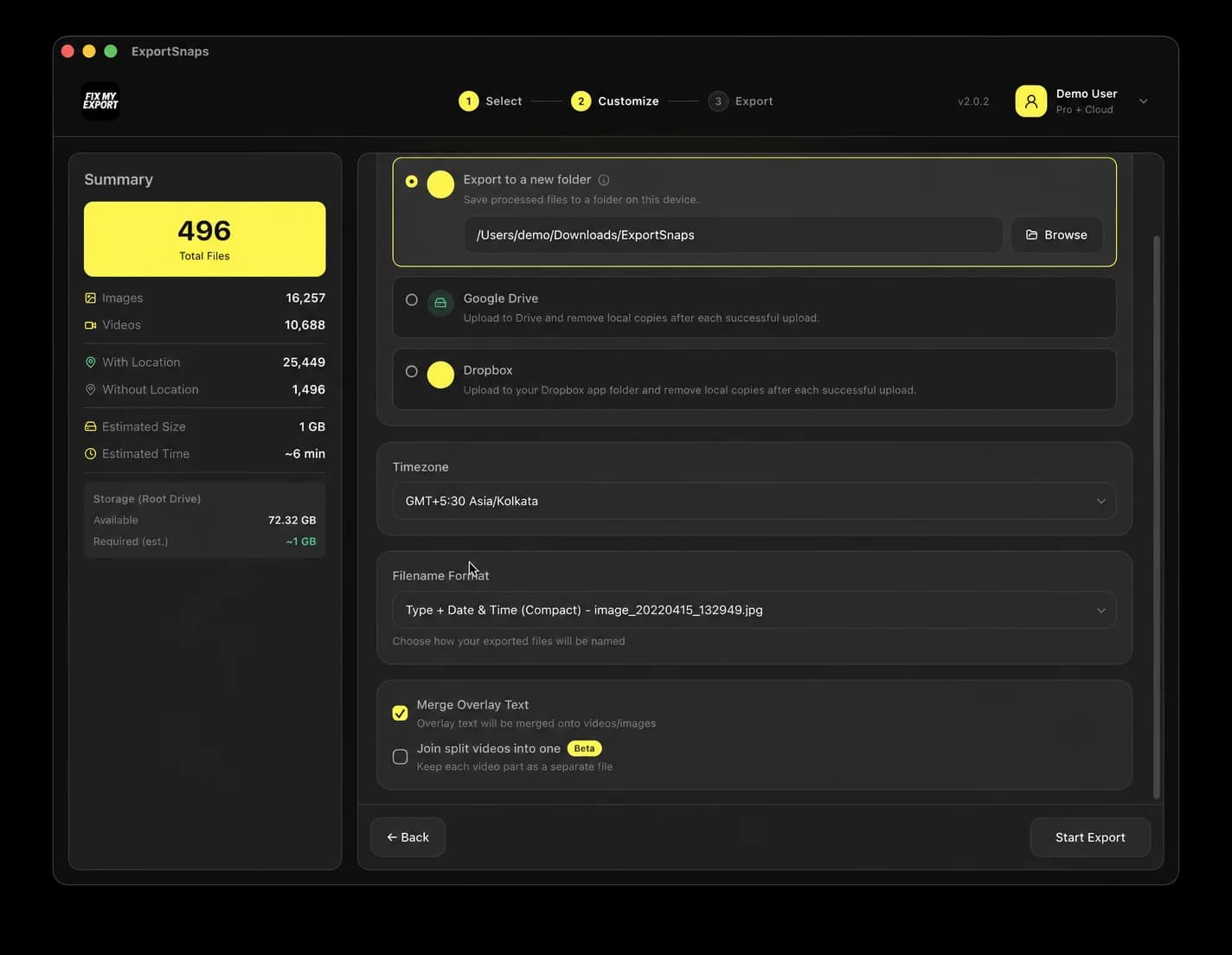
Configure Settings & Start Export
Choose an output folder or your connected Google Drive or Dropbox destination, then select options such as "Merge Overlay Text". FixMyExport processes the local media, writes supported date and GPS metadata, and merges paired overlays.
Import Fixed Files to Your Gallery App
Once processing completes, your output folder contains all photos and videos with proper EXIF metadata embedded. Import these files to Apple Photos, Google Photos, or any gallery app. They now sort correctly by actual capture date, appear on map views with GPS coordinates, and work with professional photo editing software like Adobe Lightroom. Your timeline is restored.

Restaurez d’abord le GPS. Gardez les métadonnées compatibles.
FixMyExport associe vos médias à memories_history.json et écrit les données GPS EXIF dans chaque fichier pris en charge. Il peut aussi restaurer les dates de capture, fuseaux horaires, légendes et autres métadonnées disponibles.
• No map view or location search
• Cloud upload shows wrong dates
• Professional apps can't organize properly
✓ Appears on map view with location pin
✓ Cloud upload preserves correct date & place
✓ Works in Lightroom, Photoshop & all pro apps
Benefits of Adding EXIF Metadata to Snapchat Export
Proper Date Sorting with DateTimeOriginal
Once EXIF DateTimeOriginal is embedded, Apple Photos and Google Photos sort your Snapchat memories chronologically by actual capture date, not file creation date. Your timeline becomes accurate, showing photos in the order you actually took them, which is critical for organizing years of memories. This field is the industry standard for photo timestamps used by every major gallery app.
Enable Map View & Location Search
With GPS coordinates embedded as EXIF tags (GPSLatitude, GPSLongitude), your Snapchat memories appear on map views in every gallery app. Search for "photos in Paris" or "California memories" and get instant results. Location-based smart albums work automatically across all your devices.
Universal Gallery App Compatibility
Standard EXIF, XMP, and IPTC metadata ensures your Snapchat export works perfectly in Apple Photos, Google Photos, Adobe Lightroom, Adobe Photoshop, Windows Photos, Amazon Photos, and every other photo management app. No compatibility issues, ever. Professional apps can read and edit the EXIF metadata we embed.
Cloud Service Upload Ready
Upload your fixed Snapchat memories to iCloud Photos, Google Photos, Dropbox, OneDrive, or Amazon Photos and all metadata travels with the files. Dates display correctly, location features work, and smart albums organize by place automatically across all your devices. Cloud sync actually works the way it should.
Professional Photo Software Compatible
Adobe Lightroom, Photoshop, Capture One, and other professional photo editing software can read and edit the EXIF metadata we embed. Your Snapchat memories become first-class files that work with industry-standard tools, not just consumer gallery apps. Edit, organize, and export with full metadata preserved.
Future-Proof Your Memories
Industry-standard EXIF metadata will continue working for decades. By properly embedding metadata now, you ensure your Snapchat memories remain organized and searchable regardless of which apps or services you use in the future. No lock-in, no proprietary formats-just standard tags every photo app understands.
Frequently Asked Questions
What is EXIF data?
EXIF (Exchangeable Image File Format) data is metadata embedded in photos and videos. It includes capture date, camera settings, GPS coordinates, and other information that helps organize and display your media properly.
Why doesn't my Snapchat export have EXIF data?
Snapchat strips most EXIF metadata when you export your memories. The downloaded files lack proper date taken, GPS coordinates, camera info, and other metadata that gallery apps rely on.
How do you add EXIF data to Snapchat exports?
Our app reads the memories_history.json file that contains all the original metadata. We then write standard EXIF tags into each photo and video file so they're recognized by all gallery apps, cloud services, and photo management tools.
Will this work with my photo library?
Yes. Once EXIF data is properly embedded, your files will work seamlessly with Apple Photos, Google Photos, Adobe Lightroom, Windows Photos, and any other app that reads standard EXIF metadata.
Can I export to cloud services after adding EXIF?
Absolutely. Files with proper EXIF data will maintain their metadata when uploaded to iCloud, Google Drive, Dropbox, Amazon Photos, or any cloud storage service.
Does this modify the original files?
You can choose. The app can either modify files in-place or create a new organized export folder with all EXIF data embedded, keeping your originals untouched.
What EXIF fields are added to Snapchat photos?
We add DateTimeOriginal, CreateDate, GPS coordinates (latitude/longitude), timezone information, and IPTC fields like title and description. All standard fields that photo apps expect to find.
Will EXIF metadata work in Adobe Lightroom?
Yes! We write industry-standard EXIF, XMP, and IPTC tags that work perfectly in Adobe Lightroom, Photoshop, and all professional photo editing software.
Does adding EXIF data reduce photo quality?
No. EXIF metadata is written to the file header without re-encoding the image. Your photos and videos maintain 100% original quality-only the metadata changes.
Ready to Download Snapchat Memories with Metadata?
Download our free desktop app and add complete EXIF metadata from memories_history.json to all your Snapchat memories. Perfect compatibility with Apple Photos, Google Photos, and all gallery apps. Download snapchat memories with metadata that works everywhere.
Get Started Free