Overlay repair

Automatically Merge Snapchat Overlay Files with Your Memories

Snapchat exports text, stickers and captions as separate overlay files, not merged into the photo or video. Choose your ZIPs and FixMyExport reads each base file and its overlay file, then merges them into one complete file per memory.

Separate files

memory_main.jpg

memory_overlay.png

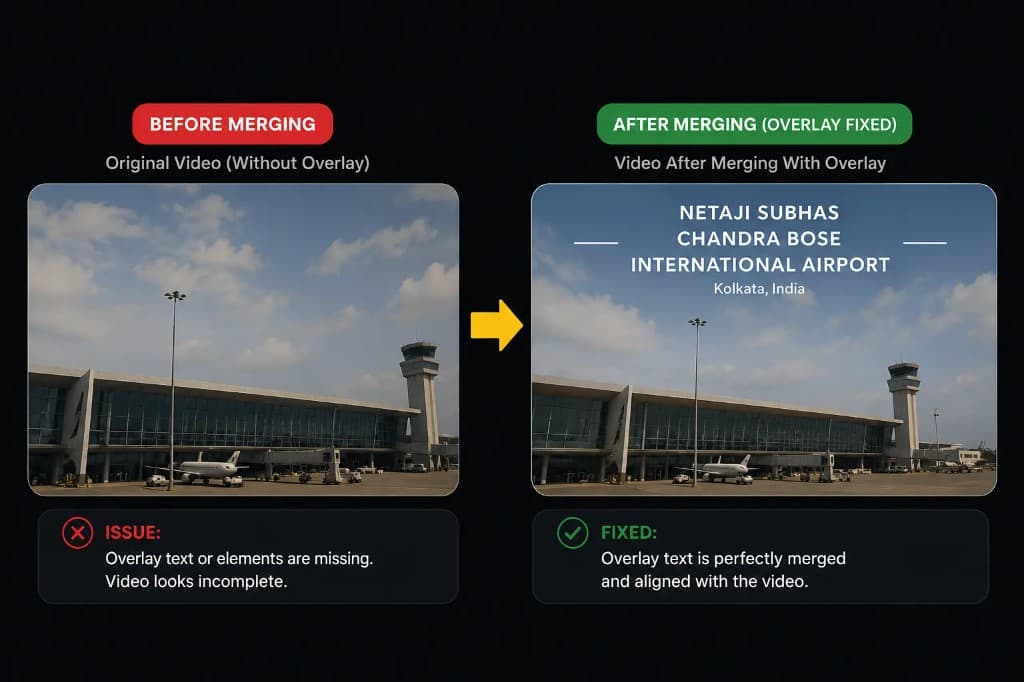
Before and after proof of a Snapchat overlay merged onto its original memory
Overlay merged

The export problem

The Snapchat Overlay Export Problem

When you download your Snapchat memories, any memory with stickers, text, captions, drawings or filters comes as two files: the base photo or video and a separate overlay file. Snapchat doesn't merge them for you, so the photo or video you open looks incomplete. Combining them by hand means finding each matching pair and layering the overlay in photo or video editing software. For an export with thousands of memories, that could take days.

01

Every Memory Split Into Multiple Files

Snapchat exports each memory with overlays as two files: the original photo or video plus a separate overlay file. You can't see the complete memory without combining them, and a large export can mean thousands of pairs.

02

Matching Each Overlay to Its Original

Each overlay belongs to one specific photo or video. Without a tool, you have to find every matching pair inside your ZIPs yourself before you can combine them.

03

Manual Overlay Merging Required

Once you've found a pair, you need photo or video editing software to place the overlay on the base file, position it correctly, and export the combined result. Doing this for every memory with overlays is practically impossible without automation.

04

Stickers & Text Lost Without Merging

If you skip the merge, you lose all the stickers, text captions, drawings, and filters you added in Snapchat. The base file looks incomplete and nothing like how the memory appeared in your Snapchat app.

One complete memory

Automatic Snapchat Overlay Merging

Click Choose ZIPs in the desktop app and select every ZIP Snapchat gave you. FixMyExport reads each base file and its overlay file from the ZIPs and merges them into a single, complete file, preserving all stickers, text, captions, and drawings exactly as they appeared in Snapchat. You don't need to unzip anything first.

After processing, you get a clean, organized folder of complete memories-one file per memory with all visual elements combined. No unzipping, no photo editing required, no missing overlays. Your Snapchat memories look exactly as you remember them, ready to view, share, or upload to any photo service.

  • Choose ZIPs: select every ZIP from your export, no unzipping needed
  • Reads each base file and its overlay file from the ZIPs
  • Merges them into one file with all stickers, text, captions & drawings
  • Handles both photo and video overlays correctly
  • Exports one complete file per memory
  • No quality loss or compression during merge
  • Joining split videos is also available, currently in beta
Separate files

memory_main.jpg

memory_overlay.png

Before and after proof of a Snapchat overlay merged onto its original memory
Overlay merged

Benefits of Automatic Overlay Merging

Save Days of Manual Work

Stop spending hours matching and merging overlays by hand. Our app processes your entire Snapchat export in minutes, automatically handling thousands of memories while you focus on enjoying them instead of fixing them.

Keep All Stickers & Text Intact

Every sticker, text caption, drawing, and filter you added in Snapchat is perfectly preserved. The merged files look exactly as they did in your Snapchat memories, with all visual elements in the right position and perfect quality.

One Complete File Per Memory

Get a clean, organized export where each memory is a single complete file. No more juggling base images and separate overlays. Everything you need is in one file, ready to view, share, or upload anywhere.

Works with Photos & Videos

The overlay merging works perfectly for both photos and videos. For videos, overlays are properly composited onto the video frames, so your final video file includes all visual elements exactly as you remember.

No Photo Editing Skills Required

You don't need Photoshop, GIMP, or any photo editing knowledge. Our app handles all the complex image compositing automatically. Just load your Snapchat export and get back perfectly merged memories.

Batch Process Entire Export

Choose all your ZIPs at once. The app reads every base file and its overlay file and merges them in the background, showing real-time progress so you know exactly when your memories will be ready.

Frequently Asked Questions

Why are Snapchat overlays in separate files?

Snapchat exports the original photo or video and any overlay (stickers, text, captions, drawings) as separate files, and doesn't merge them. The main file contains the base image or video, while the overlay file contains the added elements. This makes the export hard to use as-is.

How do I merge Snapchat overlay files manually?

Manually merging requires finding each base file and its matching overlay file in your ZIPs, opening both in photo or video editing software, layering the overlay on top of the main file, and exporting. For hundreds or thousands of memories, this is practically impossible and takes days of work.

Does your app automatically merge all overlays?

Yes. Our app automatically processes your entire Snapchat export, detects which memories have overlay files, and merges them perfectly. You get a single, complete file for each memory with all stickers, text, and drawings already combined.

Will the merged files lose quality?

No. We use high-quality image processing that preserves the original resolution and quality of both the base image and overlay. The final merged file looks exactly as it did in Snapchat, with no compression or degradation.

What happens to memories without overlays?

Memories without overlays are processed normally without any changes. The app intelligently detects which files have separate overlays and only merges those, leaving other memories untouched.

Do I need to unzip my export first?

No. Click Choose ZIPs and select every ZIP Snapchat gave you. The app reads each base file and its overlay file directly from the ZIPs, merges them, and exports everything in a clean, organized folder structure.

Does this work with both photos and videos?

Yes. The app merges overlays for both photos and videos. For videos, it ensures the overlay is properly composited onto the video frames so your final video file includes all visual elements.

How long does the merging process take?

Processing time depends on the size of your export. Most users with 1,000-5,000 memories see completion in 5-15 minutes. The app shows real-time progress so you know exactly where you are in the process.

Do I need photo editing software after using your app?

No. Once our app merges your Snapchat overlays, you have final, complete files ready to view, share, or upload anywhere. No additional software or manual editing is required.

Does this also join split videos?

FixMyExport can also join the split video segments Snapchat exports into one continuous video. Split-video joining is currently in beta, so check the results on longer videos.

Fix the rest of your Snapchat export

Ready to Merge Your Snapchat Overlays Automatically?

Download our free desktop app, choose your ZIPs, and merge Snapchat overlay files with your photos and videos. Skip the manual matching and get your complete memories in minutes.