Free for 200 files No subscription iOS, Android, Mac & Windows
FixMyExport
Processing locally
Restoring every memory
Private
Dates & GPS
Overlays
Split videos
Cloud export
Local Processing
Everything happens 100% on your device
Private media processing
Your Snapchat photos and videos are not uploaded to FixMyExport servers.
Original Quality
Keep your media quality, metadata, and story intact
Memories Fixed
Data Recovered
Hours Saved
The problem
The Snapchat Export Problem
FixMyExport fixes the broken Snapchat export process. Available on iPhone, iPad, Android, Mac, and Windows.
No GPS Location
GPS coordinates exist in your export file but Snapchat never writes them into your photos. Map view stays empty in Google Photos, Apple Photos, and Samsung Gallery. FixMyExport embeds GPS into every file so your memories appear on the map.
Broken Overlays
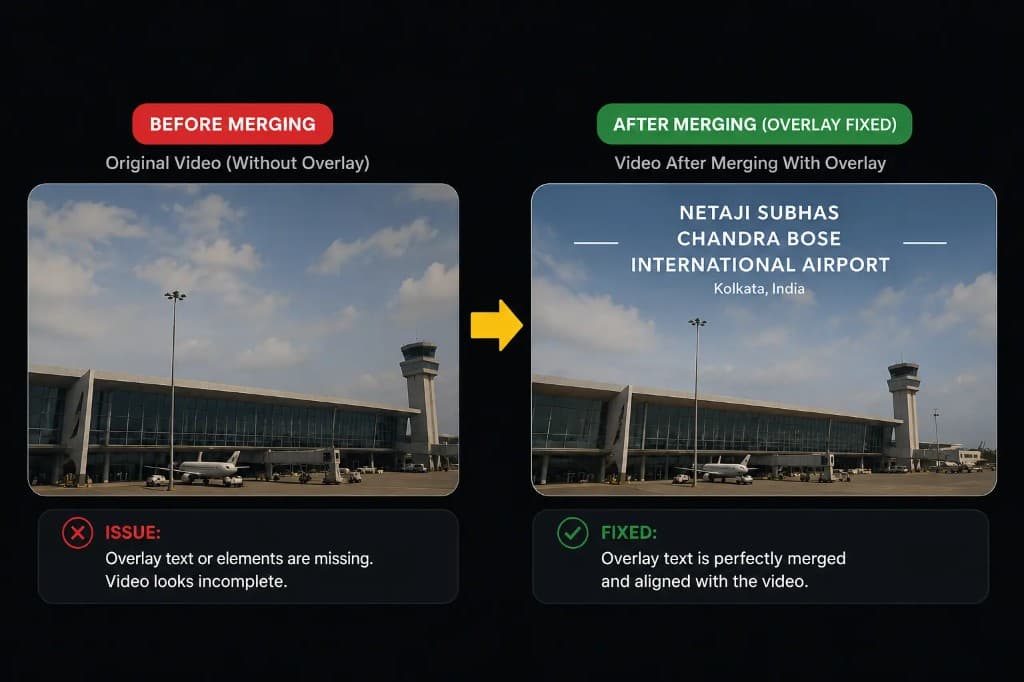
Photos and videos with text, stickers, or filters export as two separate files. The overlay can appear as a black square. FixMyExport can merge supported overlays back onto their paired photos and videos.
Split Videos
Videos export as multiple 10-second or 60-second fragments instead of one complete recording. FixMyExport detects consecutive segments and stitches them back into a single video automatically.
Snapchat now includes dates for newer exports, but memories from before early 2026 still show today's date instead of when you took them. FixMyExport restores the correct date for every memory in your library.
Built for real Snapchat exports
See what FixMyExport restores
Missing metadata, separated overlays, split recordings, and limited storage all get one clear, automatic fix.
01 · Location metadata
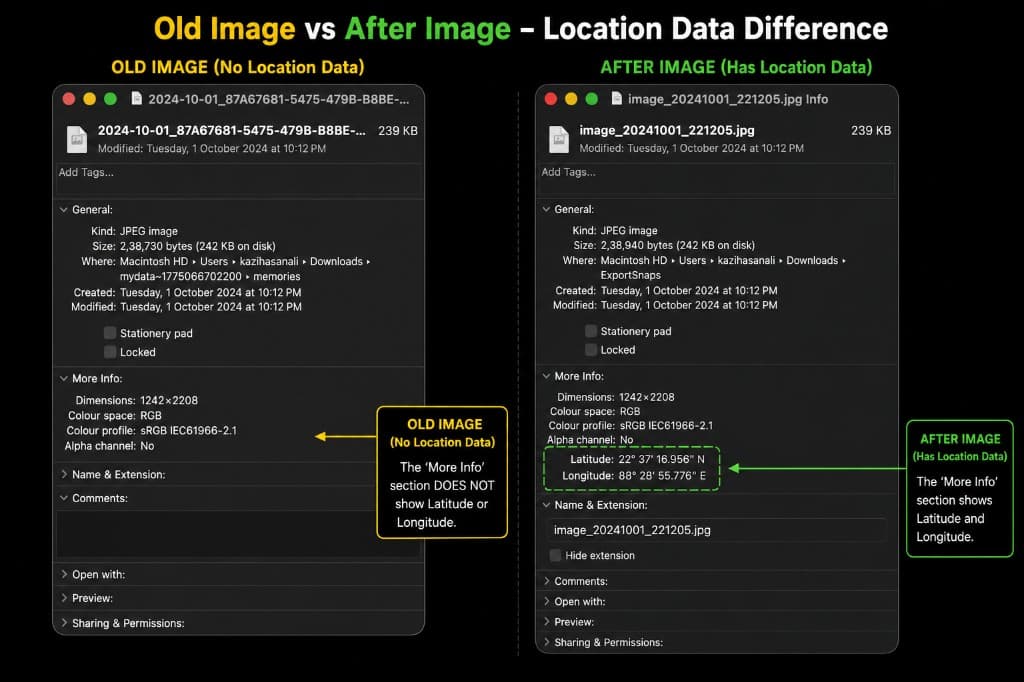
Location Data Added After Processing
Snapchat exports strip GPS coordinates from your memories. FixMyExport reads latitude and longitude from your memories_history.json and writes them into each file's EXIF metadata - so Latitude and Longitude appear in your file info, just like the original snap.
Snapchat exports memories with text or stickers as separate ZIP files. FixMyExport automatically extracts and merges the overlay back onto your photo or video, creating a single complete file.
Snapchat can export one recording as several short video files. FixMyExport identifies the parts that belong together and joins them in the right order - automatically, without trimming or manual editing.
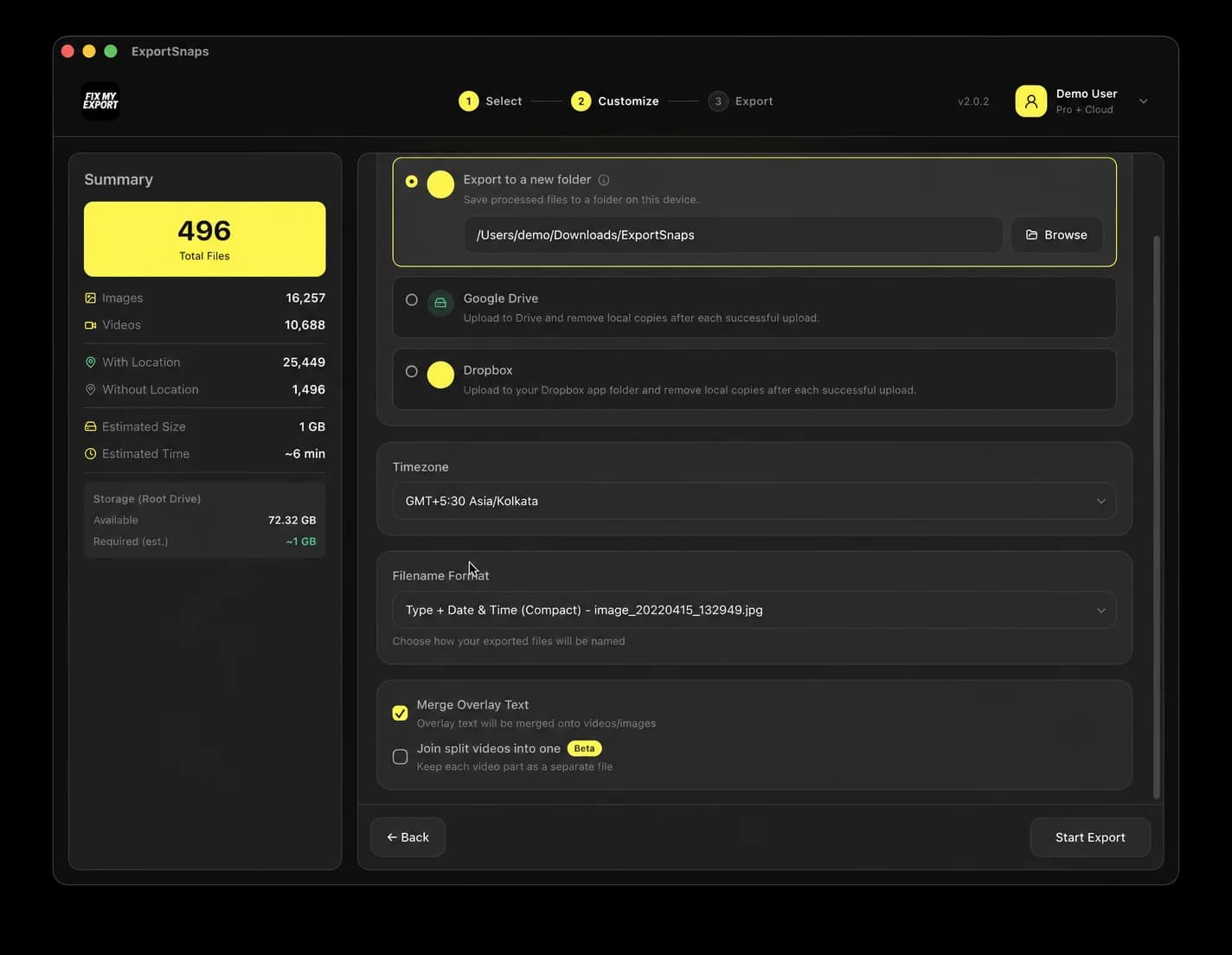
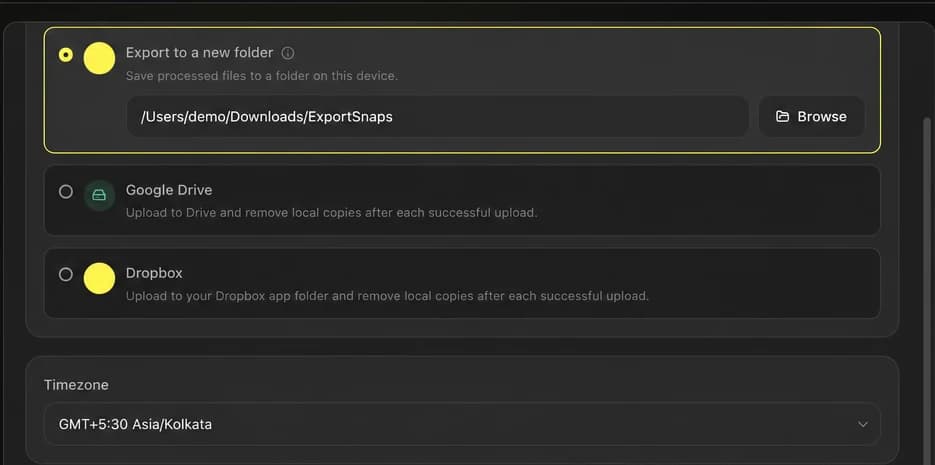
Running low on device storage? Skip saving everything locally. FixMyExport uploads your processed memories directly to Google Drive or Dropbox as each file is fixed - so you don't need double the disk space for a large export.
Why do my exported Snapchat photos show the wrong date?
Snapchat updated their export format in early 2026 to include dates for newer memories. However, memories from before this update still have no EXIF date embedded in the actual file - they show today's date instead of when you took them. FixMyExport restores the correct capture date for all memories regardless of when they were taken.
Why does Snapchat save videos separately in multiple files?
Snapchat stores videos as internal segments of 10 seconds or 60 seconds depending on when and how the video was recorded. When you export, each segment comes as a separate file. A 60-second recording exports as 6 separate 10-second files. FixMyExport detects these consecutive segments and joins them back into one complete video.
Snapchat typically sends your data ZIP within 24 to 48 hours of your request. Large libraries can take up to 7 days. Download links in the ZIP expire after 7 days, so download everything promptly once the email arrives.
What does 'your snap was exported' mean?
This notification means a snap was saved to a device using the in-app save option. It is different from the full data export at accounts.snapchat.com. The in-app export saves individual snaps to the camera roll. The full data export downloads your entire memories library as a ZIP file.
How to merge Snapchat video files after export?
Snapchat exports videos as multiple short fragments. FixMyExport automatically detects which fragments belong together and stitches them into one complete video during processing. No manual work is required.
How to fix Snapchat export wrong date on older memories?
Snapchat updated their export in early 2026 to include dates for newer memories. For older memories from before this update, the correct dates still exist in your memories_history.json file but are not embedded into the actual photo and video files. FixMyExport reads the original capture timestamp from the JSON and writes it into every file's EXIF metadata before saving, fixing both old and new memories correctly.
What does FixMyExport do?
FixMyExport processes the media in your extracted My Data folder, matches it with Snapchat's JSON metadata, and writes supported dates, GPS coordinates, and timezone-adjusted timestamps. It can also merge paired overlay assets with their original media.
Is my data safe? Do you upload my photos anywhere?
Your media is processed on your device and is never uploaded to FixMyExport servers. If you choose Google Drive or Dropbox as the destination, processed files are sent from your device to your own connected cloud account.
What platforms are supported?
FixMyExport is available for macOS 12.0+, Windows 10 1809+, iPhone and iPad with iOS/iPadOS 15.1+, and Android 7.0+.
How much does it cost?
Free for up to 200 files. Pro is $14.99 one-time payment for unlimited processing and 1 device access-no subscription.
Can it handle large exports?
Yes. Tested with 1,163.34 GB and 64,790 files. Processing typically takes 2-10 minutes depending on your library size.
What if some files fail to process?
Review the export results and restart the export. If the problem continues, contact [email protected] with the exact error text, operating system, app version, and support ID.
Will my photos work in Apple Photos / Google Photos?
Yes. After processing, your photos import with correct dates, show up on the map, and sort chronologically in any gallery app that reads EXIF metadata.
How to export Snapchat memories with metadata?
Request your data from accounts.snapchat.com (enable "Export JSON Files"), then process the export through FixMyExport to embed dates and GPS into your actual files.
How to merge Snapchat overlay files?
FixMyExport automatically merges separated overlay zips with your main photos/videos into single finished files.
How to add GPS location to Snapchat export?
FixMyExport extracts GPS coordinates from your memories_history.json and embeds them into each file, so map views work in any gallery app.
What to do if Snapchat export keeps failing?
Confirm that every Snapchat ZIP was extracted and that all memories folders were combined with the primary My Data folder. Restart the export; if it still fails, contact support with the exact error text, operating system, app version, and support ID.

 Google Drive
 Dropbox